“What is even Linux? A hardware? The guy’s name? “, (the last one is quite close btw).
This is the most frequently asked questions when I talk about Linux and perhaps, the most important one. Before we talk about Linux, we need to know what Linux is in the first place. I suppose the available definition is not simple enough.
In this post, I will explain to you what Linux is in the most simple way possible, including who the inventors, history, and some examples. Enjoy!
The Definition of Linux
“Linux is a family of operating systems that run on Linux kernel.”
Do you get it? If you don’t, let me explain it in simpler term.
An operating system (OS) is a software that lets you manage your computerfor example, Windows 11. Inside an OS is a core called, kernel. Linux was originally a kernel (core) of an operating system. This kernel was adopted by various operating system projects thus, creating Linux OS family. An individual Linux OS is called Linux distribution, a distro, or simply Linux.
Imagine a car. Inside a car, there is an engine. If an operating system is a car then, kernel is the engine. Linux is an “engine” that is used in many cars. These “cars” made up the Linux family.
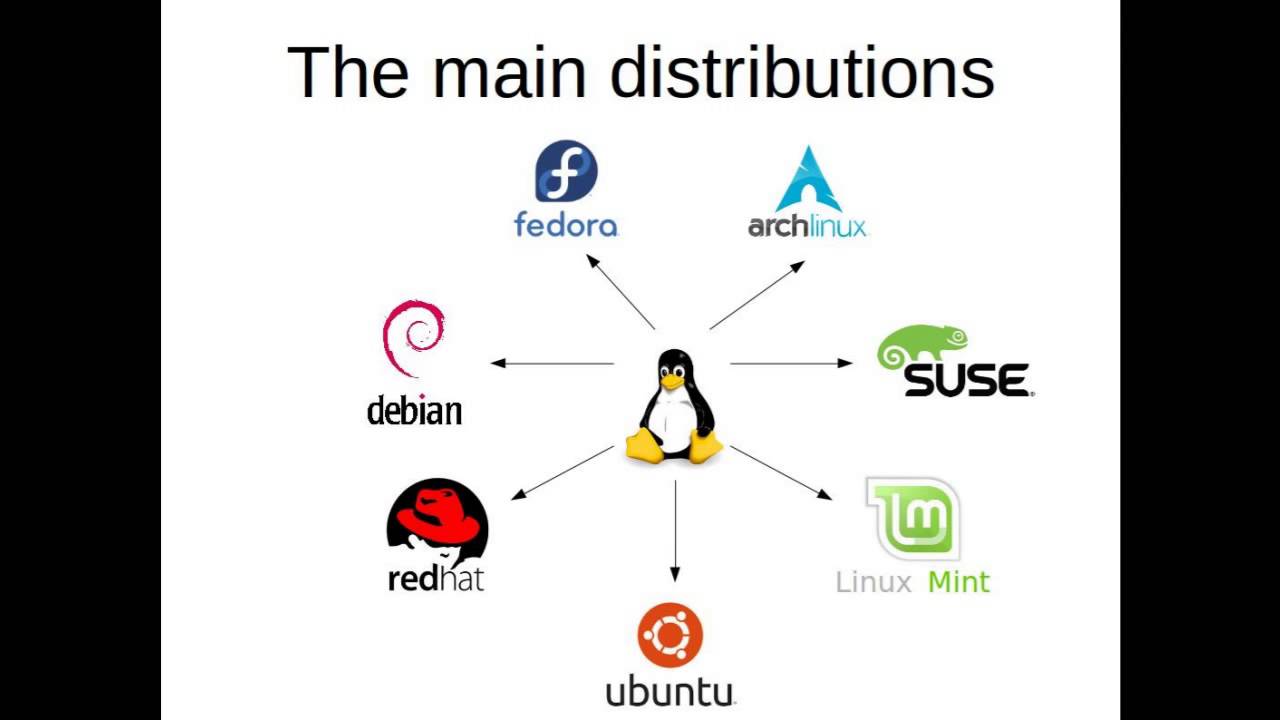
Linux Family Members
Ubuntu
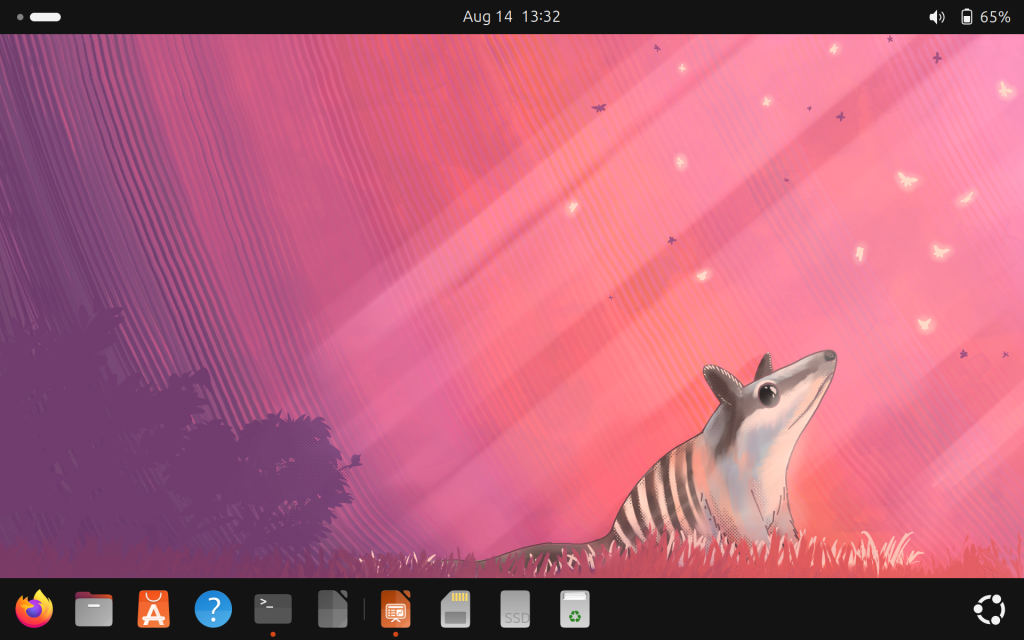
My Ubuntu desktop
Ubuntu is a Linux distribution known for being user friendly and perhaps, the most popular among beginners. You can easily use Ubuntu because it came with an intuitive desktop and a dedicated software center (like an app store). Its new version is released every April and October.
This is Ubuntu’s predecessor, as well as many other Linux. This distro is known for being stable thus, it is often used as a server OS. Despite being popular with technical user, Debian is relatively easy to use which makes it a popular choice for desktop too, although not as much as Ubuntu.
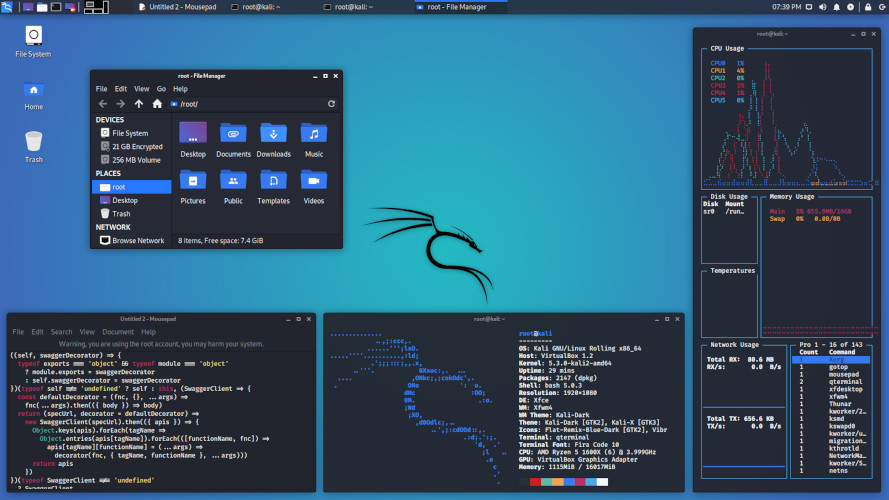
Have you seen Mr. Robot? If yes, you should know this OS.
Just like Ubuntu, Kali Linux is also based on Debian. This OS is tailored for cybersecurity professionals, containing thousands of tools for various purpose, from information gathering, exploit, even reporting that most beginners overlook. Use it lawfully!
“Btw I use Arch”, is a very common phrase you hear in Linux world. I used to say that unironically.
Arch Linux is a DIY Linux where you have to build things from ground up. When you boot into Arch, you will be greeted with a terminal but don’t worry, there is Arch Wiki. If you like challenge, this OS is the right choice for you; build your own OS.
The oldest surviving Linux. Since 1993, Slackware is committed for stability which makes it a solid choice for servers like Debian. Unlike Debian however, Slackware is known to be difficult, some argued it’s harder than Arch Linux.
The Men Behind Linux
Linux was a personal project of a Helsinki University of Technology computer science student, Linus Torvalds. Back in 1991, he was trying to build a kernel for a UNIX clone -a popular OS family at the time- and decided to share the kernel to public in. This kernel gained popularity and was made into a kernel of many OS.
In 1992, Linus released the kernel under GNU GPL, making Linux a Free Software; a software that ensures users freedom to use, to learn, to modify, and distribute which coined by Richard Stallman.
So Linux is not merely free as in free of charge, not merely open source but, also Free as in Freedom. This attribute gives Linux a unique trait among other OS.
Naming
Linus Torvalds had already considered the name “Linux”, but initially dismissed it as too egotistical. He named the project as Freax instead.
Ari Lemmke (fellow Helsinki University Technology student) who administered the server didn’t like the name. He named the project “Linux” on the server without consulting Linus, which he later permitted the change.
Penguin
Linus announced a Linux mascot back in 1996, a penguin. Larry Ewing drew the mascot based on Linus’ description. Meanwhile, James Hughes suggested the name Tux, which stands for “Torvald’s UniX” and penguin’s tuxedo-like body.
Recap
Linux is a family of Free operating systems that runs on Linux kernel.
You can imagine an OS as a car and kernel as its engine.
Linus Torvalds created Linux back in 1991 and he named Linux based on his friend’s idea.
Linux mascot is called Tux (the penguin you saw earlier).
Whenever I open Linux, my classmates often ask me, “Do you need the commandline to operate Linux?” , “Is it difficult to use Linux”, and so on. In this post, I will explain what Linux really look like and how to operate Linux.
The Desktop
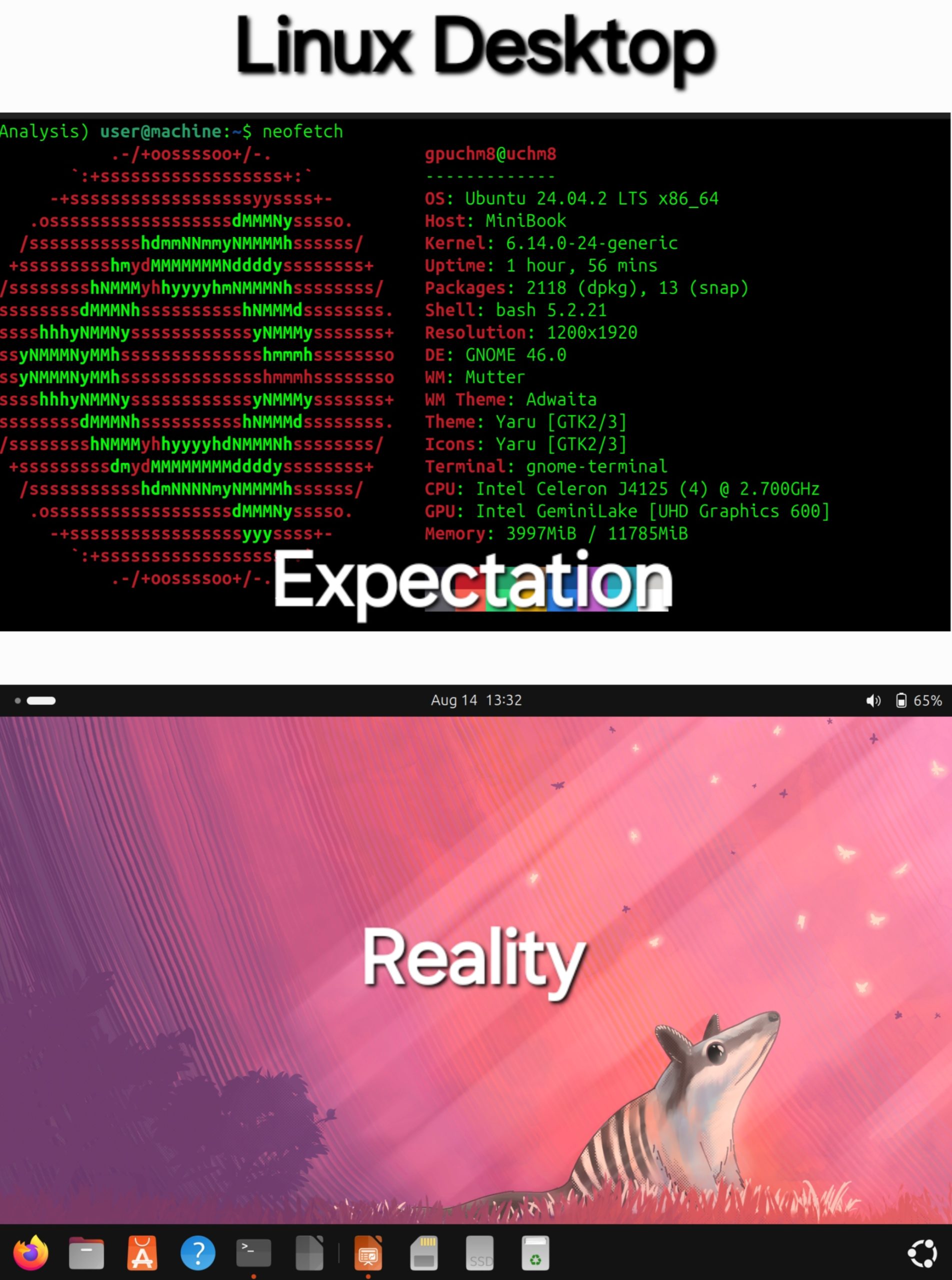
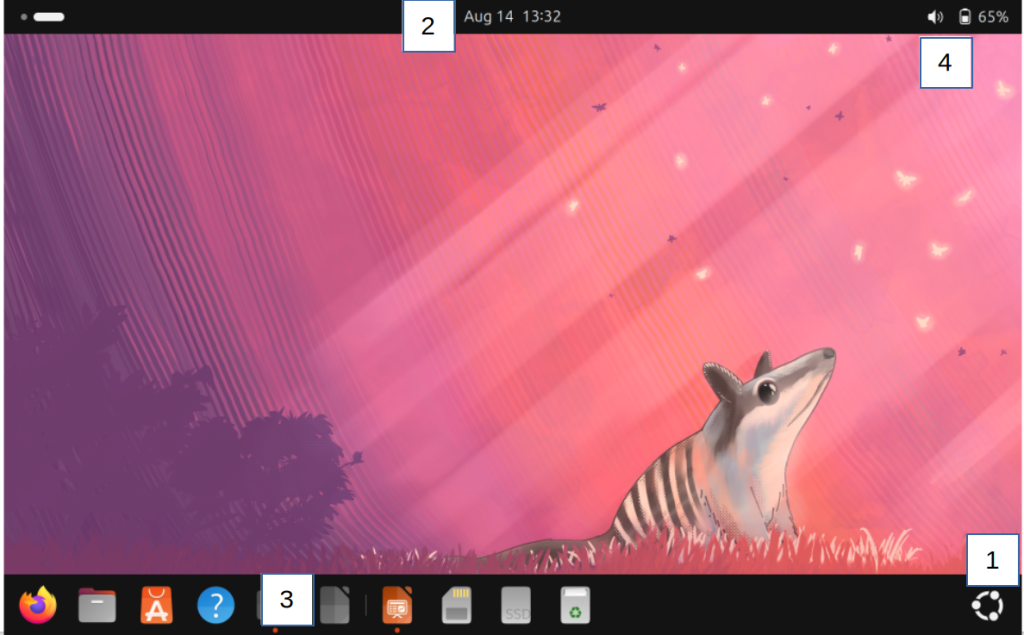
This is my Ubuntu GNOME desktop. Once you logged in to your computer, this what you see, the desktop. Yes, it is automatic; you don’t have to program anything before and you do not have to touch face cryptic text-only prompt. Let’s take a closer look.
Components
There are four points you can interact with. Here they are :
Start applications, search files, or switch workplace
Show current date, time, and calendar to make schedule
Apps you frequently used and running, similar to task bar.
If you noticed, my Linux desktop lack shortcut which Windows have. That is my choice and it’s customizable. So if you’d like to have the good old shortcut, you can do it yourself.
Starting Apps
Starting Apps in Linux
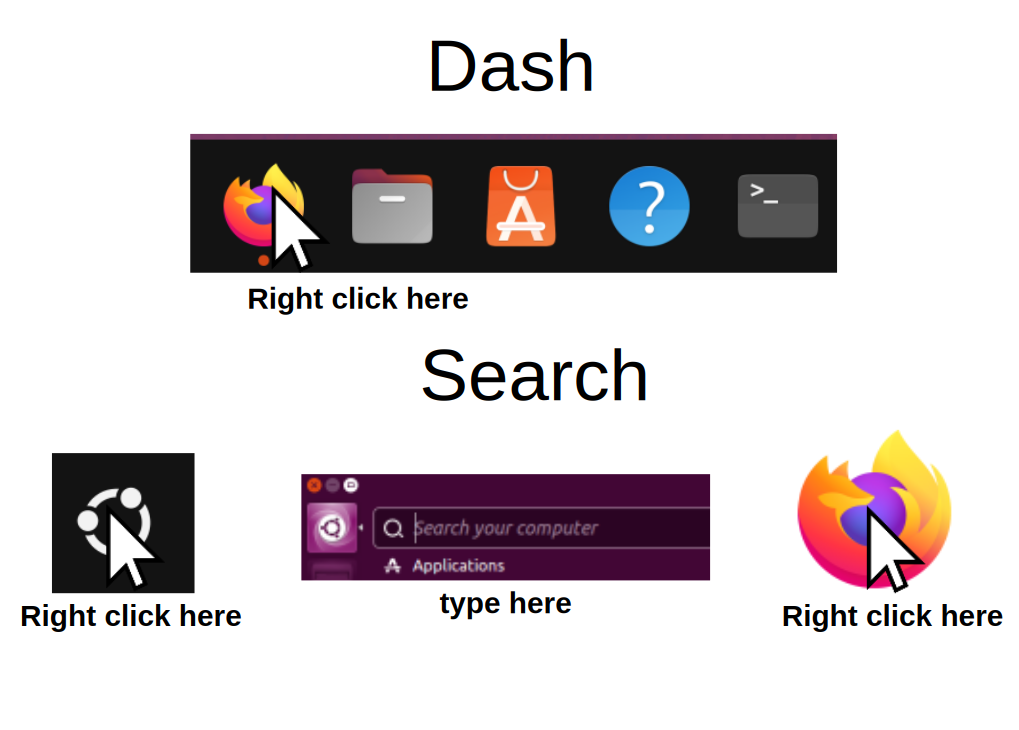
I spend most of my time in desktop to start apps. To start apps, you can do it in two ways:
Right click any apps you want in the dash.
Right click on the start button -> search the app you want to start -> and right click.
Alternatively, press the Windows key in your keyboard.
You can also tap the icon if you are on touch screen.
If you want to pin an app to dash, left click -> pin
“So what are some common Linux apps?” I will give you some suggestions.
Firefox
The flagship of Free browser. Firefox can be customized in your own ways with various add ons and themes. It also works on Windows, OS X, and Android. So if you haven’t used Linux, you might be using Firefox already.
LibreOffice
LibreOffice is a Free office suite that is installed by default in Linux. It is also available in Windows and OS X. From high school assignment, to college thesis, and study notes, you do all of them in LibreOffice.
Nautilus
The file explorer of Linux. You can operate it in the same way as Windows or OX X file managers. No need to open the commandline to manage your files.
Snap
Also known as Ubuntu app store. You can find, install, and uninstall software without touching the commandline. This repository contains many categories of Free Software from education, office, development and so on.
Terminal
This is what people think when they imagine Linux. Despite being Linux trademark, the commandline is only a part of desktop app. Unless you are in IT, running old or DIY Linux (eg: Slackware, Gentoo, Arch), or simply like it, you don’t have to touch it.
More Desktops
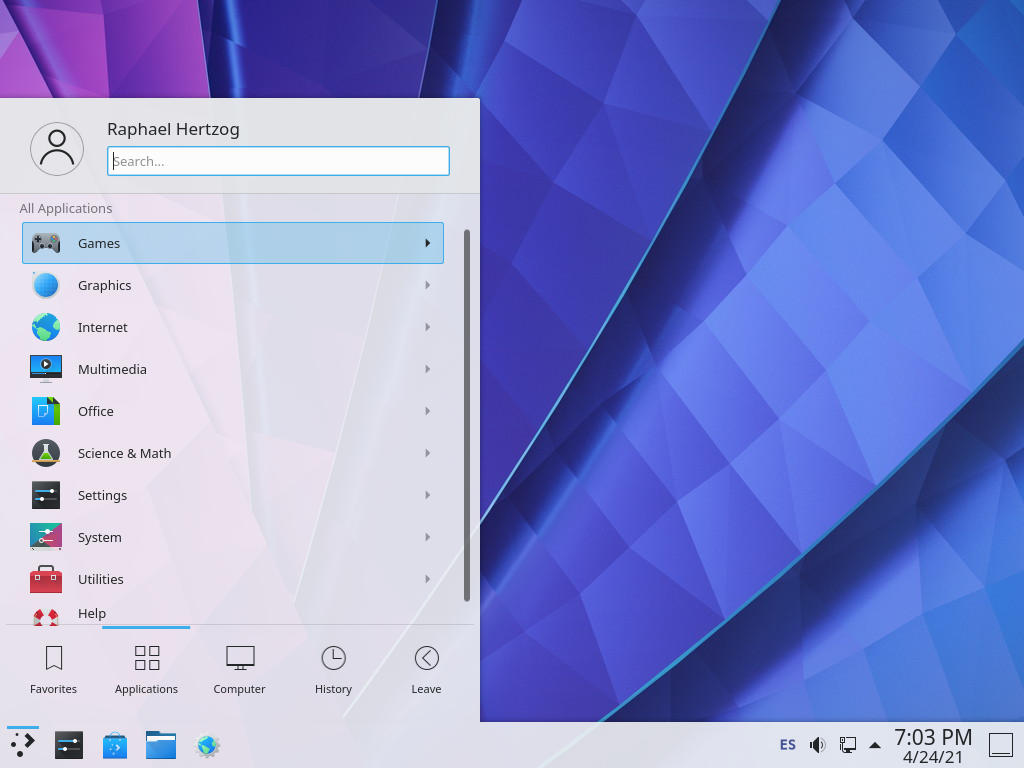
Linux gives you the freedom to customize anything, including the desktop. You could not only customize the existing desktop software but, to install an entirely different desktop environment. Imagine replacing your your entire desk in the office.
These are some popular Linux desktops :
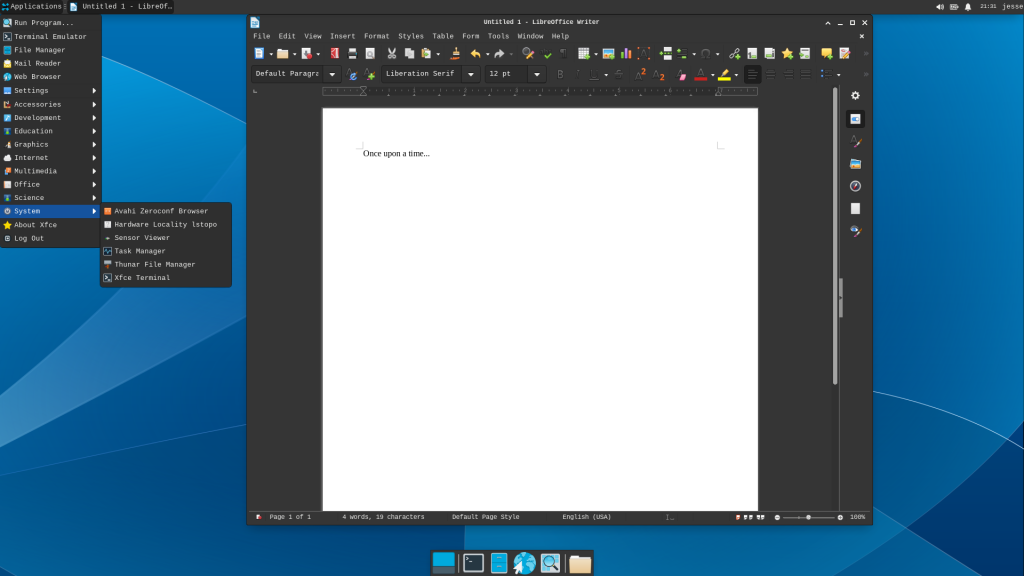
KDE Plasma LXQT XFCE
Turn Off
To turn off Linux, find the quick settings button on the top right corner. Click the power button > shutdown and wait until your laptop is off. Alternatively, you can also choose restart or log out.
What do you think about Linux? Do you like it? If yes, stay tuned for the next article. I will show you how to customize Linux.
“Linux is a Free Software that anyone can change. Is it possible for a threat actor to plant backdoor in Linux source code?“
My friend asked me this question and it is a good question. Since Linux is a Free Software that anyone can modify, it is reasonable to suspect that someone might changed it for malicious purpose. Has it happened before?
If you talk about someone planting a backdoor in the Linux Kernel source code, it hasn’t happened. This incident has occurred with other Free Software projects which makes up the Linux OS.
Linux Backdoor Attempts
AUR Backdoor
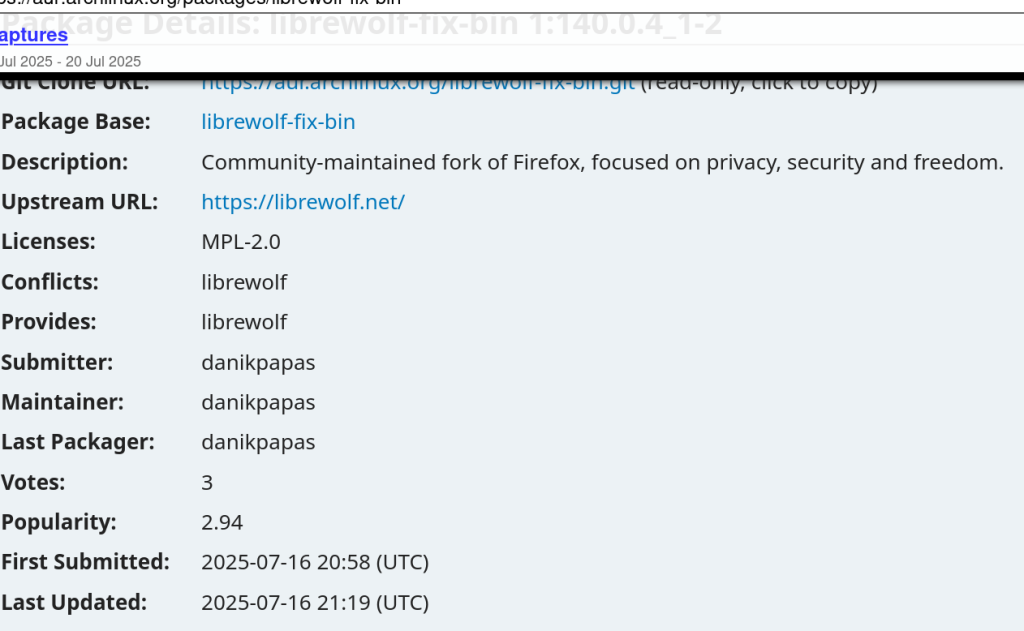
Recently in 16th July 2025, there was a backdoor disguised as a browser utility in Arch Linux User Repository (AUR).
Linux allows you to install many packages, from fonts to languages, from a compiler to IDE, even desktop environment or kernels that will heavily change your Linux. These packages are stored in repositories; think of repositories as an App Store but for Linux. Arch Linux has a repository for users submitted packages called AUR.
AUR allows any users to upload any kind of packages. A suspicious user, “danikpapas” uploaded three malicious packages, branded as “Browser Utilities Toolkit” but, it contains CHAOS RAT once installed. Arch Linux team has removed them on July 18, 2025, following community reports that flagged suspicious behavior from the packages.
XZ Backdoor
There was an even bigger case back in 2024, which shocked the entire world for the sophistication of the planned attack.
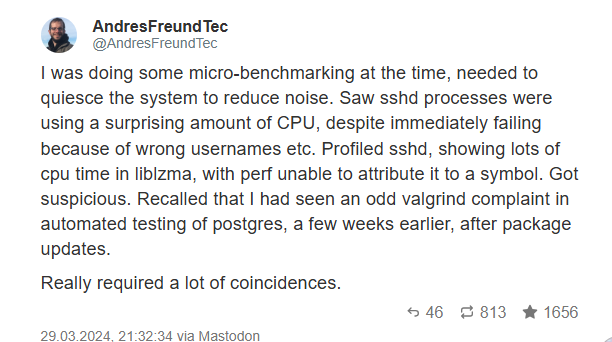
Andres Freund, a Postgre Developer, is doing usual task with his Linux machine. He noticed something is off; the program took so much resource which leads to ~500ms delay. A very short time for human yet, noticeably slow for a computer. Andres found the source of the problem, XZ, a legitimate Linux program.
“What’s the deal with XZ? Isn’t it just a Linux data compression utility?”, he thought to himself. Lasse Collin created XZ in 2005. It is a tool that compresses data into a file called .xz files, hence the name. The format is a popular way to compress Linux data and used by almost Linux distro.
Andres Freund reporting the backdoor in Linux via Mastodon (Twitter alternative)
Andres reported the incident for further investigation. . American security researcher Dave Aitel suggested the link between Jia and SVR, a Russian intelligence service. Meanwhile, journalist Thomas Clauburn suggested the link with a non-state actor.
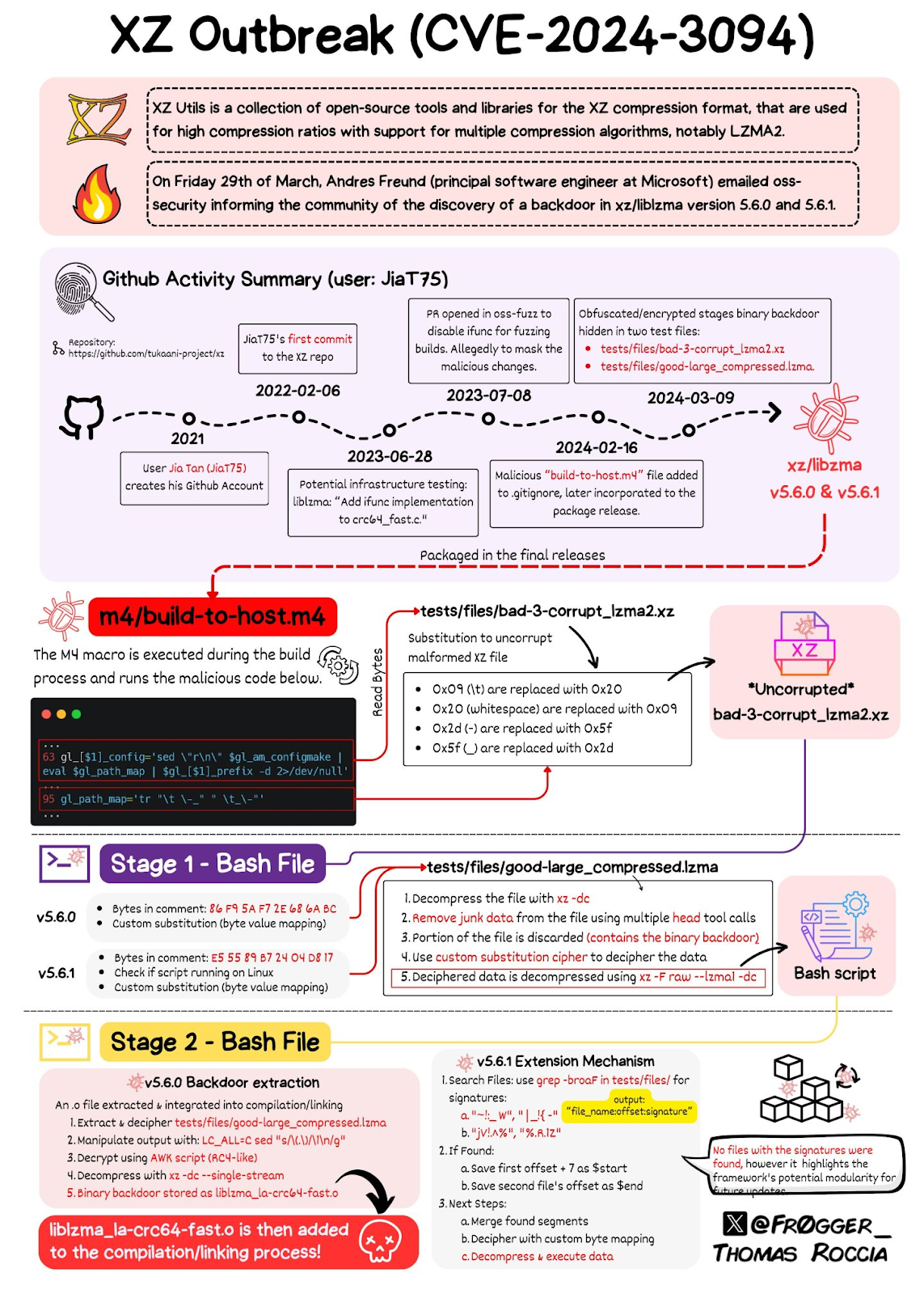
Since most Linux distro use XZ, the incident would be devastating so, Linux vendors responded quickly. Project Tukaani took down XZ version 5.6.0 and 5.6.1 . Redhat, Debian, and SUSE reverted the packages to an older version. Canonical postponed the release of Ubuntu 24.04.
XZ backdoor explained by Thomas Roccia
Other Backdoor Attempts
Outside of Linux, programming languages are vulnerable to backdoor attempts too.
Python is widely used in Linux as an automation language with Bash, and AWK. Recently, security researchers found three packages with total 39,000 downloads. These three packages are in fact, malicious.
In fact, these attempts are so common that there is an entire Github Repository dedicated to them. Security researchers called these attacks as supply chain attacks.
Conclusion
Linux is a Free Software which anyone can change so, someone can change it for malicious purpose too. You don’t need to worry however, since Linux vendors and communities constantly monitor these dangers. Whenever you want to install something, you need to be careful and make sure you trust the package. If you installed suspicious packages, follow the instructions to remove them.
“Cybersecurity is not a job; it is personal responsibility.” If you are looking to secure your WordPress blog, you are in the right place.
In this article, I will explain how to secure your WordPress blog. Since cybersecurity is not a one size fits all solution, I have to explain my situation which influences my countermeasures first.
I access my blog solely from my trusted devices and I am the only user. My threat model is Low skilled attacks that relies on phishing, brute force and low hanging vulnerability. I refrain from using pro solutions. Thus, my article will involve a little tinkering.
Countermeasures
Strong Password
This goes without saying. If your Password is easy to guess , you will be easily breached.
There are few formulas to generate a strong password. Personally I am using the diceware method. It creates a strong and memorable password.
Then, head to Users tab, find your username, and replace the password as you desired. Pay attention the the password strength indicator. Make sure it says “strong”.
Enable Multi Factor Authentication
As an additional layer, you can enable Multi Factor Authentication using plugins. Keep in mind that they won’t make yourself invincible, only harder.
Using MFA also means you have to protect your phone. Additionally if you set up security questions, use the answer that are unique and confidential. Just as your password is.
Limit Login Attempts
Brute force is an attack that tries to guess password with thousands if not millions attempts. The best way to stop it is simply limit the login attempts.
To limit login attempts, go to Plugins > search Limit Login > choose anything that fits your needs. For me WP Limit Login Attempt is enough.
This does not protect you from more sophisticated password guessing, however. Also, be careful when typing your password or you’ll get locked yourself.
Auto Update WordPress
Keeping your system up to date is a simple way to keep yourself safe. A system can be compromised because it’s out dated, thus allowing attackers to exploit old vulnerabilities.
To enable auto update, you can check Dashboard>Home>Update. Alternatively consult your hosting provider if they take care of it.
Anti Spam Countermeasure
Phishing is a simple yet effective attack vector. To stop phishing attack possibilities, I adjusted some settings in the comment section.
Users must fill username and email.
Comments only from registered and approved users.
Lock commenting on posts older than two weeks, so spammers can’t keep spamming my site.
Comment Settings
Better yet, use an anti-spam protection plugin such as Akismet.
Conclusion
I have explained few simple steps to secure your wordpress blog. The countermeasures I deployed are based off my plan which changes over time.
After this, I will do SEO audit for this blog. It will make my site even more popular, thus inviting more attackers, and changing my plan.
So if you find my article relevant and would like to see how it changes, feel free to bookmark!
Muslims are required to pray five times a day in the prescribed time, they are : Shubuh, Dzuhur, Ashar, Maghrib, and Isya. As a muslim who is still learning the basics, I pray regularly but sometimes I miss one to few times. “How many times do I pray in a day?”, “Which shalat am I frequently missed?”, or “Where do I usually pray?”, these are the questions I frequently asked. Unfortunately I didn’t have the answer.
Method
I have came up with several way to measure shalat using what’s called as mental models. There are atleast 4 models if i recall correctly, starting from at some point in 2021. Back then, I didn’t do it regularly.
Recently I came up with a way to measure shalat. Each shalat is categorized into three parameters, Commitment (Committed/Abandoned), Place(Home/Mosque), and Person(Jamaah/Alone). Then, I count each category to get overview of my shalat so I can answer my question. You can find the full instruction on Github.
Think of the instruction as if you are talking to yourself.
“Assalamualaikum, did you commit shalat dzuhur?” -> Commitment
Waalaikumussalam, yes, I did. -> Committed
“Alhamdullilah, where did you pray?” -> Place
Today is raining so I pray at home. -> Home
“Did anyone else pray with you?” -> Person
I pray alone -> Alone
Then you could write it down on paper as the following :
Dzuhur : Committed, Home, Alone
And you do the same thing with the rest of shalat.
This is not the only method I use to measure shalat. I’ve had this idea as early as 2021, but at the time I only wrote the rules on paper and no surviving documents. Back then, I didn’t do I regularly either. Thus, I will demonstrate shalat measurement using the current method only.
Implementation
I wrote my shalat records on my journal. This means I need to transcribe them to the computer in order to calculate them. My goal is to analyze all of my shalat records in entire month. For the purpose of this article alone and to simplify things, I will analyze my shalat records from the five days of early december 2024 and five days of january 2025.
After that, I calculated my shalat record using Google Sheets (Forgive me Mr.Stallman). You can use any spreadsheet programs that you like, be it LibreOffice, OpenOffice, or even physical spreadsheet if you hate technology (why are you reading this?). I thought using the commandline to calculate the data, but that’ll be another article.
Open your spreadsheet program. Then, create three sheets with the following purposes :
1. Data 1 : The data of earlier days, in this case December 2024.
2. Data 2 : Data 1 : The data of later days, in this case January 2025.
3. Dashboard : The sheet where you will be doing the calculation for both data.
After that, open the Data 1 sheet or whatever you decided to name it and create the following attributes on top of the row :
Date : The date where you committed the shalat.
Shalat : The name of the shalat committed, shubuh, dzuhur, ashar, maghrib, isya.
Committment : Whether you committed or abandoned the shalat.
Person : Whether you commit the shalat alone or jamaah.
Place : Whether you commit the shalat at mosque (and mushalla) or at home.
To make it better, you can use a drop-down menu from data validation. If you are using Google Sheets, follow this :
Data > Data Validation > Edit rule
After that, fill in the data. This is the real exercise; be honest with yourself and fill it as you did. The end result should look like this :
Calculation
Now we move on to the dashboard. The calculation will be a simple summary of each category.
Formula : =COUNTIF(December_2024!$C:$C, $A$4)
This formula will check the December 2024 data to find the data of A4 cell, Committed. Other attributes are calculated in the same way, so adjust the COUNTIF according to the data of each attribute’s range and attribute’s cell.
After that, we will calculate the percentage. It’s useful to indicate whether we fully committed to the five daily prayer.
Formula : =B4/($B$4+$B$9)
The formula divides the value of the cell in the current attribute with total value of all shalat that we are supposedly committed, which is the addition of shalat committed and shalat abandoned. Don’t forget to format the cells with percentage, and adjust the decimals accordingly.
Ideally, your shalat record should improve over the time. To make it easier to tell, I decided to make another column named ‘growth’. It’ll tell me if my records went up, went down, or stay the same. The logic goes like this :
If score after > score before, then “positive”
If score after < score before, then “negative”
else, “none
Muslim men are required to pray in the mosque, thus I highlight the cell in green to make it easier to find it.
Here is my results.
If you feel too lazy to actually make it, I have provided the templatehere.
Conclusion
I have demonstrated the way to measure and analyze shalat. So far I have only shown the measurement method and overview of the analysis using spreadsheet. On the next articles, I will show how to analyze the spreadsheet with commandline utilities and possible way to improve the analysis.
Lately, I noticed a lot of thoughts related content on social media. They range from simple mental models, such as Ockham’s Razor to complete philosophy like Stoicism, from ‘hard’ analytical method such as Network Analysis to ‘softer’ method like Business Model Canvas, to vague phrases like “Think Different”. I enjoy reading them. The existence of such posts indicate that people care to improve their thinking. Do they actually help though?
Before we dig deeper, I want to define what I mean by thinking. Thinking in this article isn’t limited to academic pursuit of or specific discipline. I’m talking about thinking in general, “To form an idea of something.” as defined in the English dictionary. The dialogues in your head, information you recall, opinion you have, and images you imagine. They are all thoughts; you are thinking as you do those things.
In short, I don’t think so. Those materials are good, but they don’t address the real problems we face; we cannot express what we are thinking. We think all the time, in fact human brain produces about ~6000 thoughts everyday. Why can’t we express them? Obviously most of our thoughts are subconscious, but there are two more causes from my experience :
1. We are focused to observe the external world.
2. We are not honest with ourselves.
This is my observation in class. When we are learning, we only pay attention to what our teachers say, or worse chatting and playing games; we rarely internalize them because we don’t pay attention inside. Thus, when we are asked to give opinions or questions, we can’t say anything. If anything students tend to say what they are thinking once the class is over.
Not to mention that the class tend to be judgemental. Student who asks weird questions or different opinion are often made fun by others, and worse, labelled as ‘difficult student’ by the teachers, hence “Dawg I really want to say it but I just can’t.” is a frequent line students say.
Thankfully I’m different from other kids. I say what I’m thinking, so I ask questions even made a controversial statements freely. Even so, there are times where I felt doubt, almost held back what I say, even changed my mind to fit in. This is why having an non-judgemental environment is important.
And sometimes there’s so much thoughts going on inside my mind. There are times where I feel overwhelmed that I escape with games or exercises. I can hear my inner dialogue clearly so it’s like being in a very loud party, except the sounds are inside my head.
How do we improve our thinking? The solution is “simple”, but not so easy to actually do this; take your time to focus and notice what you are thinking. Get a piece of paper and set a timer say, five minutes. Write whatever comes to your mind. If you will, make it a habit and keep a journal.
This is called “free writing”. It’s nothing new, neither I invented it. I saw this technique on Farnam Street article years ago, yet I was not convinced because it looks so simplistic. “No way it can be that simple”, I said to myself, because I believed the key to think better lies in esoteric philosophy or ground breaking neuroscience.
Finaly, I heard it from Professor Patrick Barry during my Writing Specialization in Coursera. He talks about how writing is mapping your mind and brought up the free writing as an exercise. My writing improved greatly ever since then. I don’t need to think what I want to write (or type in this article), but I can simply write as I speak without thinking. Thus, I can ‘see’ my thoughts much clearer.
Unfortunately since I’m not an expert, I can’t clarify my claims. Take my claim -that writing freely can improve your thinking- with a bucket of salt. Yet even if it’s bogus, free writing has its benefits, although this is something which impact can only be felt. Also, that is not to say the above contents are useless. They work, only if you can think clearly.
In this article, I’ll show you how I solved the OSINT Quiz 006 from Gralhix. I give myself 30 mintues to solve it. Enjoy!
Problem
Caption “BREAKING: TTPcarried out a suicide attack on a police post in Khyber city of Pakistan that killed three Pakistani police officers.“ Image
Verify the image but don’t go after the journalist
Tldr : The photo was not taken in Pakistan and it’s not a TTP attack. It’s orginally taken in Iraq.
Reflection
I restate the problem in my own language to simplify it. (Problem Restatement)
I restate the problem in the following : “There was a terrorist attack in Pakistan. A journalist claimed that the picture attached as the attack mentioned. I need to find out if the photo really was the terrorist attack mentioned (TTP attack in Pakistan)?”
Next, I have to verify it. How can I tell if it’s true? Simple, I need to find out whether it was really happening in Pakistan. Then if it’s really in Pakistan, I will dig deeper to see if it’s really the TTP attack which the post describes.
Next as usual, I use Yandex as a starting point. I noticed some results that can reveal the answers :
I noticed Cирия (Syria), but is it really in Syria though? I don’t know either but, that’s not the task.
I concluded that the photo is not a TTP attack. Besides, the photographer didn’t even take it in Pakistan at all.
During this quiz, I found out who the journalist was. I decided not to dig further however, because that’s not the task. So we’re back to the initial question.
I have answered the question, although my curiosity remains. Where was this photo taken, really?
I decided to dig further for the answer, then I found a page from Wikimedia. The Wikimedia description lists US Navy as the source with the link to US Navy official site, although the link is dead.
I suppose there is a way to find the archive, but I haven’t learned that far yet. So I decided to end this task. After this, I will attempt the next OSINT Quiz.
So that’s my Write Up for OSINT Quiz 006. I found how my little russian knowledge can help me answered this quiz.
In this article, I’ll show you how I solved the OSINT Quiz 002 from Gralhix. I give myself 30 mintues to solve it. Enjoy!
Problem
Find out the train station’s name in the image.
Measure the tallest building in the image.
Tldr : I found out that the station’s name is Flinders Street Station at Melbourne and the tallest building is the IBM Tower131m/430 ft. However, I got the second question wrong. Despite that, I will leave it as it is for lessons sake.
Reflection
Find out the train station’s name in the image
I will use Nixintel gap analysis to solve this challenge. For the first question, I need to answer the stations name. The gap analysis is shown by quote block for the sake of readability, but the result and everything else stays the same.
I can use Buildings to give more context of the station
After that, I list up what should I know to answer this.
Train station name in the picture
Finally, I can devise a plan to figure it out.
Look up Flinders Street station
Look for buildings to give more context
Result :
The station’s name is Flinders Street Station. I figured it out based on the obvious nameplate that is visible in the image and based on the visual additional visual clues provided by Wikipiedia. Clue 1 , Clue 2
Measure the tallest building in the image.
Now that I figure out the station’s name, I can answer the next question. I need to figure out what is the tallest building in the image, but I need to know what is the tallest building first. To do so, I simply looked at the image for the tallest building.
Based on the visual clues, I choose the building with the black nameplate on the right. IBM? Let’s find out. Then I found the building data on Skyscraper Center. It is IBM Australia or also known as Southgate Tower 1. However, something feels off.
The Realization
Since there is no way to tell if my answer is right like TryHackMe does, I decided to check others’ write up with the intent to correct myself, but I have locked my answer to IBM Tower131m/430 ft. I checked a write up by Johnny Gizmo on Medium. The answer is Focus Building at 166 meters tall.
OSINT Quiz 002 highlighted my problem : I jumped into conclusion. I hyper focused to the IBM tower and forgot to consider another options. Lesson learned : observe more and consider moreoptions.
Search Light CTF is a beginner level CTF made by Zewensec hosted at TryHackMe. It teaches the basics of Geolocation and Imagery intelligence. The problem is divided into nine tasks which explains the techniques & few questions to answer using the said techniques.
Search Light CTF is the part of my submission for OSINT Dojo Student rank requirements. To make this CTF more challenging, I decided to add my own rule : finish the questions within 30 minute. If I failed to finish it in 30 minute, the score will be zero, and I have to move on to the next question.
Search Light CTF Write Up
Task 1
Task 1 explains what the CTF is and what should you do and asks you if you understand it by the end of the section. I instantly typed “yes” but I was wrong, then I typed few more times and still got it wrong until I lost my calm. After that, I decided to take a break and read it again, carefully. Guess what, I just have to type sl{ready}. We haven’t started the quiz yet, but there goes the first lesson, read carefully.
Task 2
Material
The first question explains more about geolocation challenges. It tells you the list of questions that you can use to get started with answering the challenges (Benjamin Strick):
Any obvious data in the image that can reveal the location? (Street & store signs)
Can you identify the region of the image? (Driving side, language, architect)
Do you recognize the environment? (Road sign, nature, motor brands)
What is the quality of the environment? (Paved or gravel roads)
Is there any unique landmark? (Building, bridges, statues)
Problem
What is the name of the street that was taken?
Reflection
I Instantly asked myself, “Any obvious data in the image that can reveal the location?”, and yes there is. The “Welcome to Carnaby Street” sign, so the answer is Carnaby Street.
Task 3
Material
The next task explains about Google search engine operators which also known as Google Dorks. I have been using Google Dorks long before I get into CTFs, but this is the first time I see them being used for geolocation.
Problem
Which city is the station located in?
Which tube station do these stairs lead to?
Which year did this station open?
How many platforms are there in this station?
Reflection
To solve this problem, I need to figure out what’s the station’s name first. How could I find it? I noticed a covered letter “*lly Circus Station”, so I decided to look it up with Duckduckgo and found out that the station’s name was “Picadilly Circus Station” in London. Ater that, I looked up when the station was opened (1906) and the numbers of platforms (4) through Wikipedia and London Underground site.
Task 4
Problem
Building this photo taken in
Country of this building
The name of the city
Reflection
I notice the “yvr.ca” letter in the image, thus it must be somewhere in Canada, but where to be precise? Then I decided to visit the web and read what it is, the Vancouver International Airport website so the building is Vancouver International Airport. Last question was the city which I typed “Vancouver” and got it wrong. Apparently Vancouver isn’t a city name, but Richmond is.
Task 5
Problem
Coffee shop, city
Coffee shop, street name
Coffee shop, phone number
Coffee shop, email address
Coffee shop, owner’s surname
Reflection
This one is the trickiest by far. No obvious clues like the previous images. I decided to manually bruteforce the city name by using the list of cities in Scotland but didn’t get anything.
So decided to read again, closely. Here are the clues I gathered :
Scotland
Coffee shop
The best lunch
Edinburgh Woollen Mill
The building’s physical features
I looked up what Edinburgh Woollen mill is. Luckily, I found an article with photo identical to the task’s image here which shows Blairgowrie as the location. Thus, I can narrow it down to the Edinburgh Woollen Mill at the city and found out the Coffee Shop through google maps.
After that, I dug the info on Wee Coffee shop at Allan Street from the phone number (+447878 839128), to email (theweecoffeeshop@aol.com) and the owners names are David and Debbie Cochrane according to this website.
Task 6
Material
This task introduces Reverse image search to “extract” information from an image by using the image as the search’s term. Sometimes it does not go well so Aric Toler adviced us to do these things :
Search engine priority : Yandex > Bing > Google
Images from Central & South America, Africa, and Asia are much harder to locate.
Methods to improve image search :
Increase the resolution
Crop or pixelate certain elements
Mirror, filter, clone tools can work too
Consider using specialized search engines or databases.
Problem
The restaurant name in the photo (famous nickname)
Bon Appetit editor who took this image (located in a youtube video)
Reflection
I used Yandex reverse image search to do look up which restaurant it was taken. The first result showed the Insider news with its nickname (Katz’s Deli). After that, I looked for Bonnapetit article using Duckduckgo and found out that it was written by Andrew Knowlton.
Task 7
Material
No new material but it reminds us to scan for visual clues, reverse image search, use search operators and be patient. It should be easy.
Problem
The name of the statue
The photographer
Reflection
As usual, reverse image search with Yandex reveal its location, Tjuvholmen Sculpture Park (Oslo) but nothing reveals the statue’s name so far. I visited the park’s information from Wikipedia, Trip Advisor, and Astrup Fearnley Museet but nothing shows up.
I decided to tap hint but it does not make sense at all. What’s even that supposed to mean? Even google translate does not make any sense.
At this point I was losing my calm and felt like hitting the laptop screen but that won’t get me anything either. I managed to calm down and looked again. A page from Wikimedia showed up and further scroll revealed that it is “Rudolph the Chrome Nosed Reindeer“
There’s five minute left but I haven’t answered the 2nd question at all. I noticed a write up made by someone else with the answer and that triggered a “moral conflict”.
“Why don’t you just copy someone’s answer? I mean, that’s OSINT too right, the info is already public.”
Yeah I know, but I don’t feel right about this. Ethics is part of the investigation. How can I stick to ethics if that’s what I do?
“Come on, it’s just a game.”
Yeah it’s just a game, but doesn’t a game prohibit you from cheating? If you cheat, you suck, but I’m not.
“Think practical. What if the requirement is to 100% the CTF?”
Find another ctf and 100% it then.
“But you are wasting more time.”
No, time is wasted if you enjoy it.I decided to left it blank for honesty. That won’t give me any score but I don’t care.
This is the toughest task. I feel so stupid for not being able to solve this. Should I just give up already?
Task 8
No I didn’t give up. I’m back for another quiz. Hopefully it won’t be so hard.
Material
The material is a video by Amy Herman which explains how observing arts can change how you think. Honestly I don’t understand what is being said yet, but I believe that I need to be more patient.
Problem
The name of the character
Location of the statue
Opposite building name
Reflection
Yandex reverse image search returns Фемида (Femida). What is this? Apparently it’s Themis in russian, but Themis returns incorrect answer. I figured out that the statue’s name is Lady Justice after a few tries.
The statues name is the Lady Justice, but there should be many of such statues around the world. I need to be specific. Another article from Ria Novosti presents the statue with США, which is USA in russian. So we need to look up “Lady Justice statue in USA”.
The search returns The Verge article featuring the same image of the statue, then I looked up the link of the image which reveals to be Gettyimages source. I figured out that the statue was located at Albert V Bryan Courthouse in Alexandria, Virginia where its opposite location isThe Westin Aexandria Old Town.
Task 9
Material
The last task is a bit different.While the previous tasks were about geolocating images, this one focuses on gelocating video instead. I don’t put the video file here because it’s too big for the website.
The steps are almost the same, but with an additional addition, we use FFMPEG to turn video’s frames into images. After that, we can analyze it as usual.
Problem
The name of the hotel which the recording took place.
Reflection
I decided to challenge myself by not using FFMPEG, instead I looked at the video myself and took screenshots. The landscape looks like Singapore, but I need more context.
Then I noticed “Riverside Point” at the right of the hotel. After that, I checked Google Map and look around for the hotel. I tried to guess the hotel’s name. To narrow my guesses, i take notes of the answer format “4 words, 7-9-6-4 characters each”. Novotel Singapore Clarke Quay was the answer.
Conclusion
So that’s how my Search Light CTF went. While it’s cliche, this CTF taught me to be patient and read carefully, even though I don’t lack those qualities. That aside, this CTF showed me that I’m afraid of failure more than I admit it. On the more practical side, I really need an efficient way to manage my files and keep my notes.
This CTF also taught me the importance of languages. By the time of writing this, I’m learning Spanish already with familiarity in Arabic & Russian. My little Russian knowledge helped me to narrow down the location as the Task 8 shown, meanwhile Task 7 gave me headache as I have to scroll through Norwegian sites. Sure we have advanced translators now but I’d rather master the language myself.







,_Astrup_Fearnley_Museet_(Renzo_Piano),_Oslo_-_Norway.jpg)