Category: Uncategorized

  • What is Linux?

    What is Linux?

    “What is even Linux? A hardware? The guy’s name? “, (the last one is quite close btw).

    This is the most frequently asked questions when I talk about Linux and perhaps, the most important one. Before we talk about Linux, we need to know what Linux is in the first place. I suppose the available definition is not simple enough.

    In this post, I will explain to you what Linux is in the most simple way possible, including who the inventors, history, and some examples. Enjoy!

    The Definition of Linux

    “Linux is a family of operating systems that run on Linux kernel.”

    Do you get it? If you don’t, let me explain it in simpler term.

    An operating system (OS) is a software that lets you manage your computer for example, Windows 11. Inside an OS is a core called, kernel. Linux was originally a kernel (core) of an operating system. This kernel was adopted by various operating system projects thus, creating Linux OS family. An individual Linux OS is called Linux distribution, a distro, or simply Linux.

    Imagine a car. Inside a car, there is an engine. If an operating system is a car then, kernel is the engine. Linux is an “engine” that is used in many cars. These “cars” made up the Linux family.

    Linux Family Members

    Ubuntu
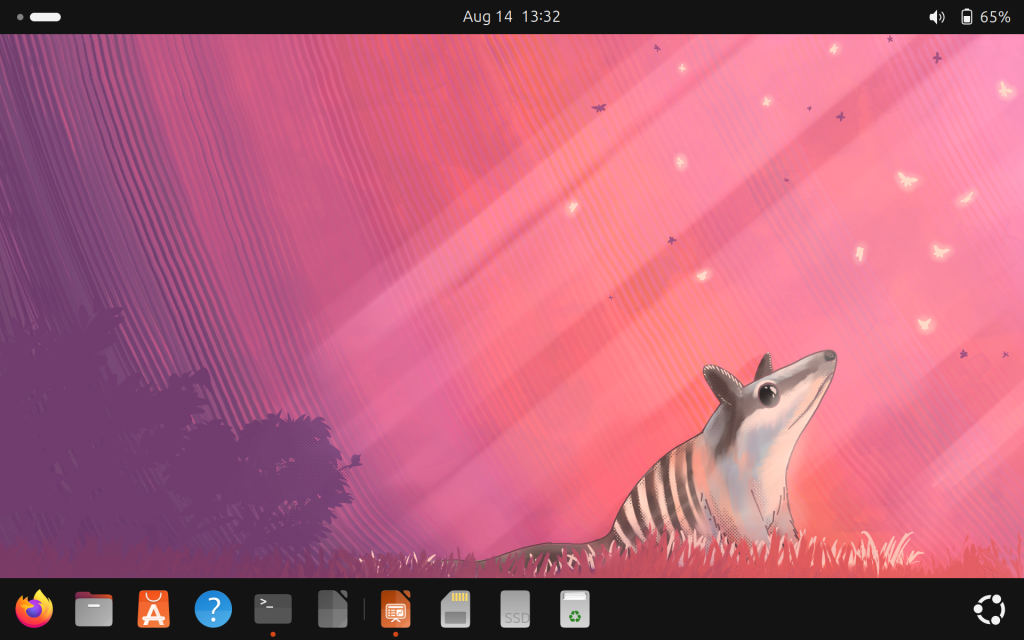
    My Ubuntu desktop

    Ubuntu is a Linux distribution known for being user friendly and perhaps, the most popular among beginners.  You can easily use Ubuntu because it came with an intuitive desktop and a dedicated software center (like an app store). Its new version is released every April and October.

    I use Ubuntu btw

    Debian
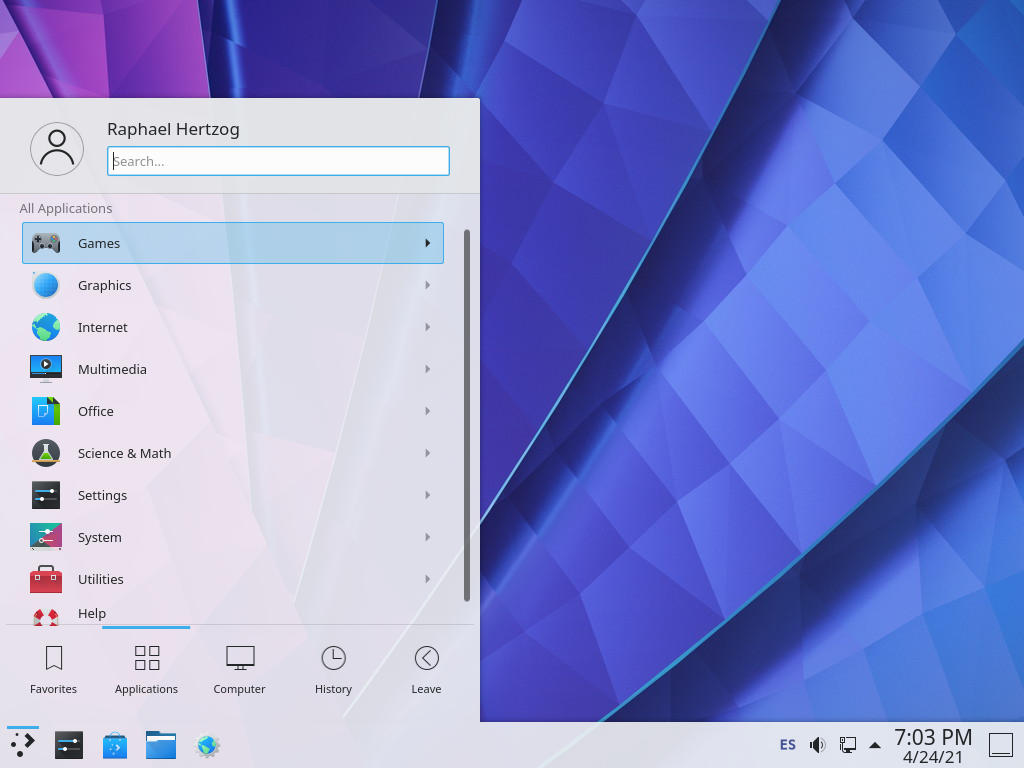
    Debian with KDE desktop

    This is Ubuntu’s predecessor, as well as many other Linux. This distro is known for being stable thus, it is often used as a server OS. Despite being popular with technical user, Debian is relatively easy to use which makes it a popular choice for desktop too, although not as much as Ubuntu.

    Kali Linux
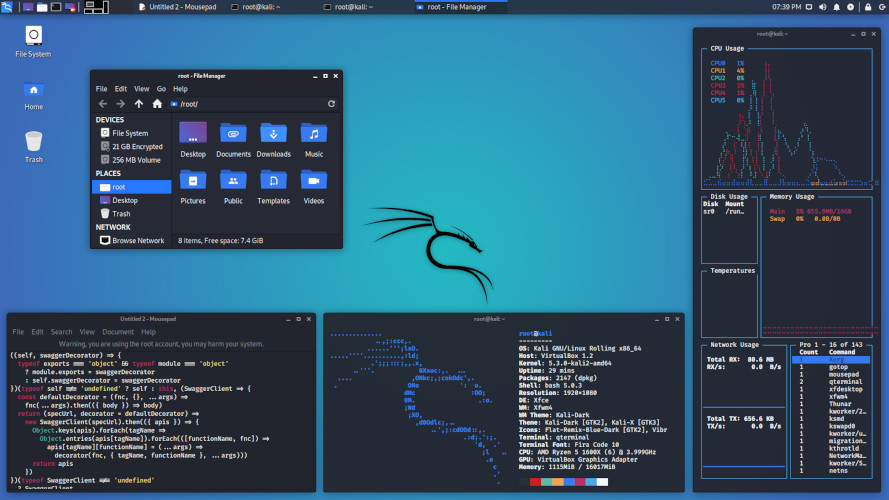
    Kali Linux with hacking tools

    Have you seen Mr. Robot? If yes, you should know this OS.

    Just like Ubuntu, Kali Linux is also based on Debian. This OS is tailored for cybersecurity professionals, containing thousands of tools for various purpose, from information gathering, exploit, even reporting that most beginners overlook. Use it lawfully!

    Arch Linux
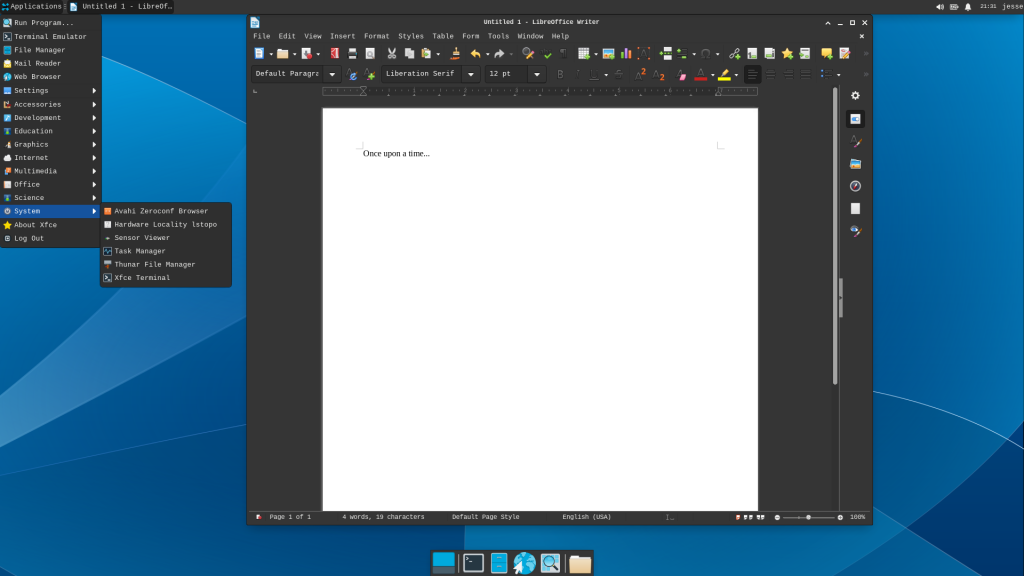
    Arch Linux with minimal desktop

    “Btw I use Arch”, is a very common phrase you hear in Linux world. I used to say that unironically.

    Arch Linux is a DIY Linux where you have to build things from ground up. When you boot into Arch, you will be greeted with a terminal but don’t worry, there is Arch Wiki. If you like challenge, this OS is the right choice for you; build your own OS.

    Slackware

    Slackware Desktop

    The oldest surviving Linux. Since 1993, Slackware is committed for stability which makes it a solid choice for servers like Debian. Unlike Debian however, Slackware is known to be difficult, some argued it’s harder than Arch Linux.

    The Men Behind Linux

    Linux was a personal project of a Helsinki University of Technology computer science student, Linus Torvalds. Back in 1991, he was trying to build a kernel for a UNIX clone -a popular OS family at the time- and decided to share the kernel to public in. This kernel gained popularity and was made into a kernel of many OS.

    In 1992, Linus released the kernel under GNU GPL, making Linux a Free Software; a software that ensures users freedom to use, to learn, to modify, and distribute which coined by Richard Stallman.

    So Linux is not merely free as in free of charge, not merely open source but, also Free as in Freedom. This attribute gives Linux a unique trait among other OS.

    Naming

    Linus Torvalds had already considered the name “Linux”, but initially dismissed it as too egotistical. He named the project as Freax instead.

    Ari Lemmke (fellow Helsinki University Technology student) who administered the server didn’t like the name. He named the project “Linux” on the server without consulting Linus, which he later permitted the change.

    Penguin

    Linus announced a Linux mascot back in 1996, a penguin. Larry Ewing drew the mascot based on Linus’ description. Meanwhile, James Hughes suggested the name Tux, which stands for “Torvald’s UniX” and penguin’s tuxedo-like body.

    Recap

    • Linux is a family of Free operating systems that runs on Linux kernel.
      • You can imagine an OS as a car and kernel as its engine.
    • Linus Torvalds created Linux back in 1991 and he named Linux based on his friend’s idea.
    • Linux mascot is called Tux (the penguin you saw earlier).

    See also

    Linux, a family of operating systems

    Distro Watch – The Wikipedia for Linux
    Richard Stallman – The Creator of Free Software

    More Questions

    The desktop

  • Welcome to Linux!

    Welcome to Linux!

    Whenever I open Linux, my classmates often ask me, “Do you need the commandline to operate Linux?” , “Is it difficult to use Linux”, and so on. In this post, I will explain what Linux really look like and how to operate Linux.

    The Desktop

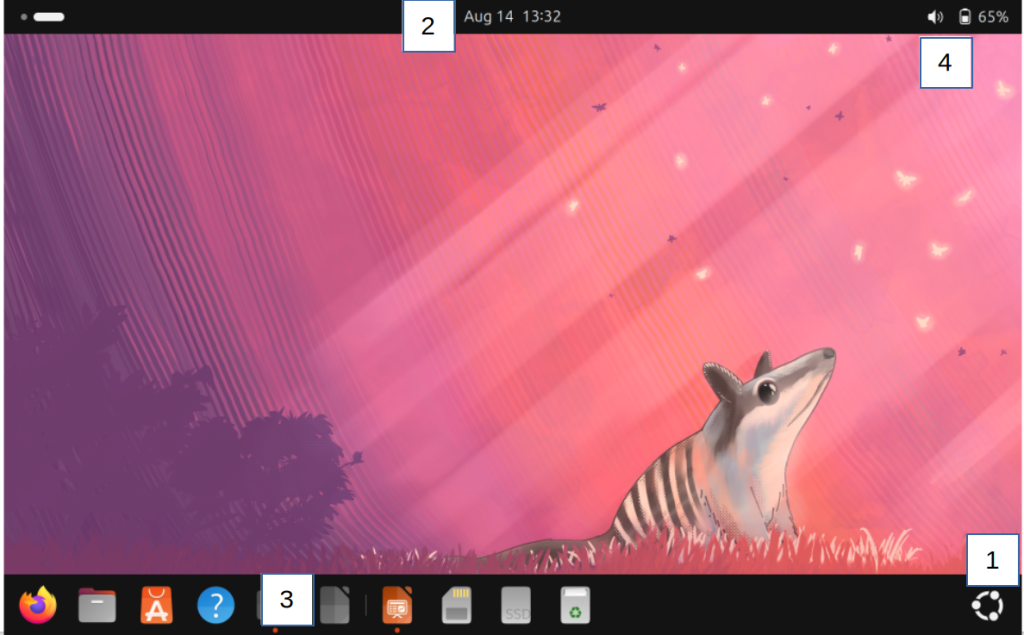
    This is my Ubuntu GNOME desktop. Once you logged in to your computer, this what you see, the desktop. Yes, it is automatic; you don’t have to program anything before and you do not have to touch face cryptic text-only prompt. Let’s take a closer look.

    Components

    There are four points you can interact with. Here they are :

    1. Start applications, search files, or switch workplace
    2. Show current date, time, and calendar to make schedule
    3. Apps you frequently used and running, similar to task bar.
    4. Battery info, adjust brightness, sound, connection, etc

    Feel free to click them and play around!

    If you noticed, my Linux desktop lack shortcut which Windows have. That is my choice and it’s customizable. So if you’d like to have the good old shortcut, you can do it yourself.

    Starting Apps

    Starting Apps in Linux

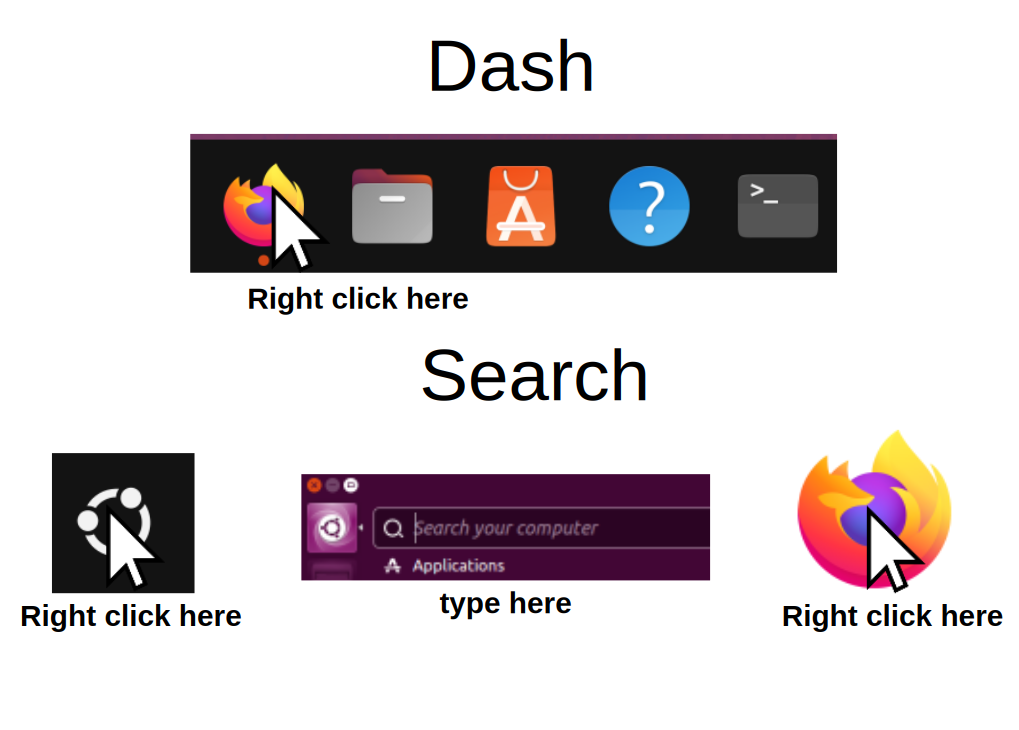
    I spend most of my time in desktop to start apps. To start apps, you can do it in two ways:

    1. Right click any apps you want in the dash.
    2. Right click on the start button -> search the app you want to start -> and right click.
      • Alternatively, press the Windows key in your keyboard.
      • You can also tap the icon if you are on touch screen.
      • If you want to pin an app to dash, left click -> pin

    “So what are some common Linux apps?” I will give you some suggestions.

    Firefox

    The flagship of Free browser. Firefox can be customized in your own ways with various add ons and themes. It also works on Windows, OS X, and Android. So if you haven’t used Linux, you might be using Firefox already.

    LibreOffice

    LibreOffice is a Free office suite that is installed by default in Linux. It is also available in Windows and OS X. From high school assignment, to college thesis, and study notes, you do all of them in LibreOffice.

    Nautilus

    The file explorer of Linux. You can operate it in the same way as Windows or OX X file managers. No need to open the commandline to manage your files.

    Snap

    Also known as Ubuntu app store. You can find, install, and uninstall software without touching the commandline. This repository contains many categories of Free Software from education, office, development and so on.

    Terminal

    This is what people think when they imagine Linux. Despite being Linux trademark, the commandline is only a part of desktop app. Unless you are in IT, running old or DIY Linux (eg: Slackware, Gentoo, Arch), or simply like it, you don’t have to touch it.

    More Desktops

    Linux gives you the freedom to customize anything, including the desktop. You could not only customize the existing desktop software but, to install an entirely different desktop environment. Imagine replacing your your entire desk in the office.

    These are some popular Linux desktops :

    KDE Plasma
    LXQT
    XFCE

    Turn Off

    To turn off Linux, find the quick settings button on the top right corner. Click the power button > shutdown and wait until your laptop is off. Alternatively, you can also choose restart or log out.

    What do you think about Linux? Do you like it? If yes, stay tuned for the next article. I will show you how to customize Linux.

    References

    Linux Desktop Environments list

    GNOME official website

  • Is it possible to plant a backdoor in Linux?

    Linux is a Free Software that anyone can change. Is it possible for a threat actor to plant backdoor in Linux source code?

    My friend asked me this question and it is a good question. Since Linux is a Free Software that anyone can modify, it is reasonable to suspect that someone might changed it for malicious purpose. Has it happened before?

    If you talk about someone planting a backdoor in the Linux Kernel source code, it hasn’t happened. This incident has occurred with other Free Software projects which makes up the Linux OS.

    Linux Backdoor Attempts

    AUR Backdoor

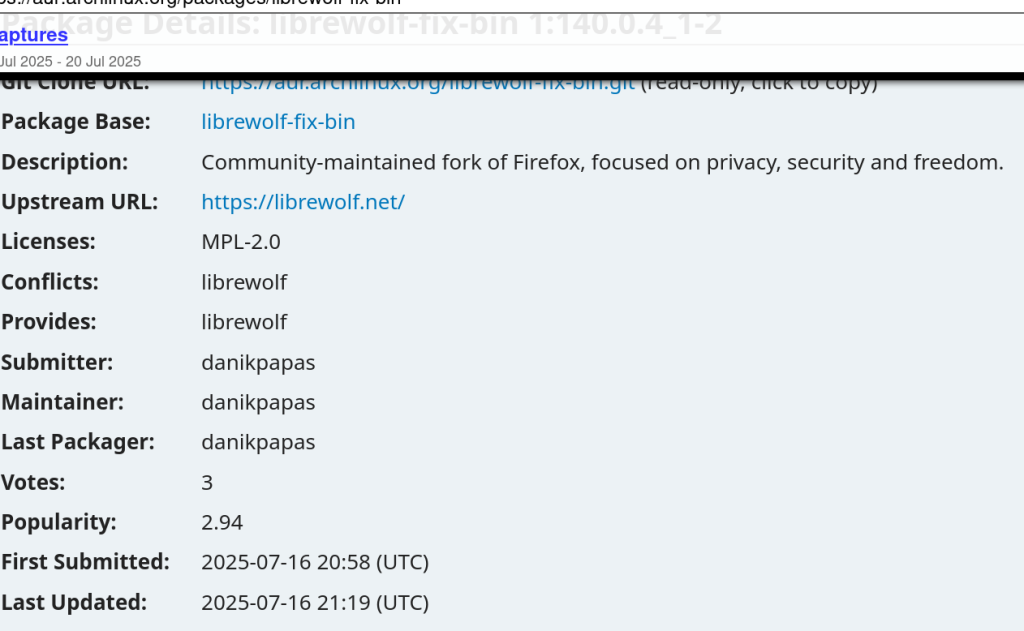
    Recently in 16th July 2025, there was a backdoor disguised as a browser utility in Arch Linux User Repository (AUR).

    Linux allows you to install many packages, from fonts to languages, from a compiler to IDE, even desktop environment or kernels that will heavily change your Linux. These packages are stored in repositories; think of repositories as an App Store but for Linux. Arch Linux has a repository for users submitted packages called AUR.

    AUR allows any users to upload any kind of packages. A suspicious user, “danikpapas” uploaded three malicious packages, branded as “Browser Utilities Toolkit” but, it contains CHAOS RAT once installed. Arch Linux team has removed them on July 18, 2025, following community reports that flagged suspicious behavior from the packages.

    XZ Backdoor 

    There was an even bigger case back in 2024, which shocked the entire world for the sophistication of the planned attack. 

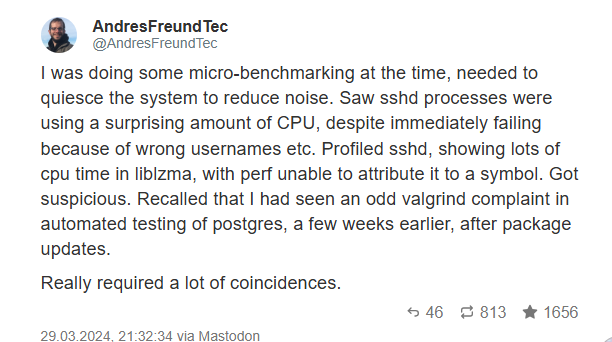
    Andres Freund, a Postgre Developer, is doing usual task with his Linux machine. He noticed something is off; the program took so much resource which leads to ~500ms delay. A very short time for human yet, noticeably slow for a computer. Andres found the source of the problem, XZ, a legitimate Linux program.

    What’s the deal with XZ? Isn’t it just a Linux data compression utility?”, he thought to himself.  Lasse Collin created XZ in 2005. It is a tool that compresses data into a file called .xz files, hence the name. The format is a popular way to compress Linux data and used by almost Linux distro.

    Andres Freund reporting the backdoor in Linux via Mastodon (Twitter alternative)
    Andres Freund reporting the backdoor in Linux via Mastodon (Twitter alternative)

    Andres reported the incident for further investigation. . American security researcher Dave Aitel suggested the link between Jia and SVR, a Russian intelligence service. Meanwhile, journalist Thomas Clauburn suggested the link with a non-state actor. 

    Since most Linux distro use XZ, the incident would be devastating so, Linux vendors responded quickly. Project Tukaani took down XZ version 5.6.0 and 5.6.1 . Redhat, Debian, and SUSE reverted the packages to an older version. Canonical postponed the release of Ubuntu 24.04. 

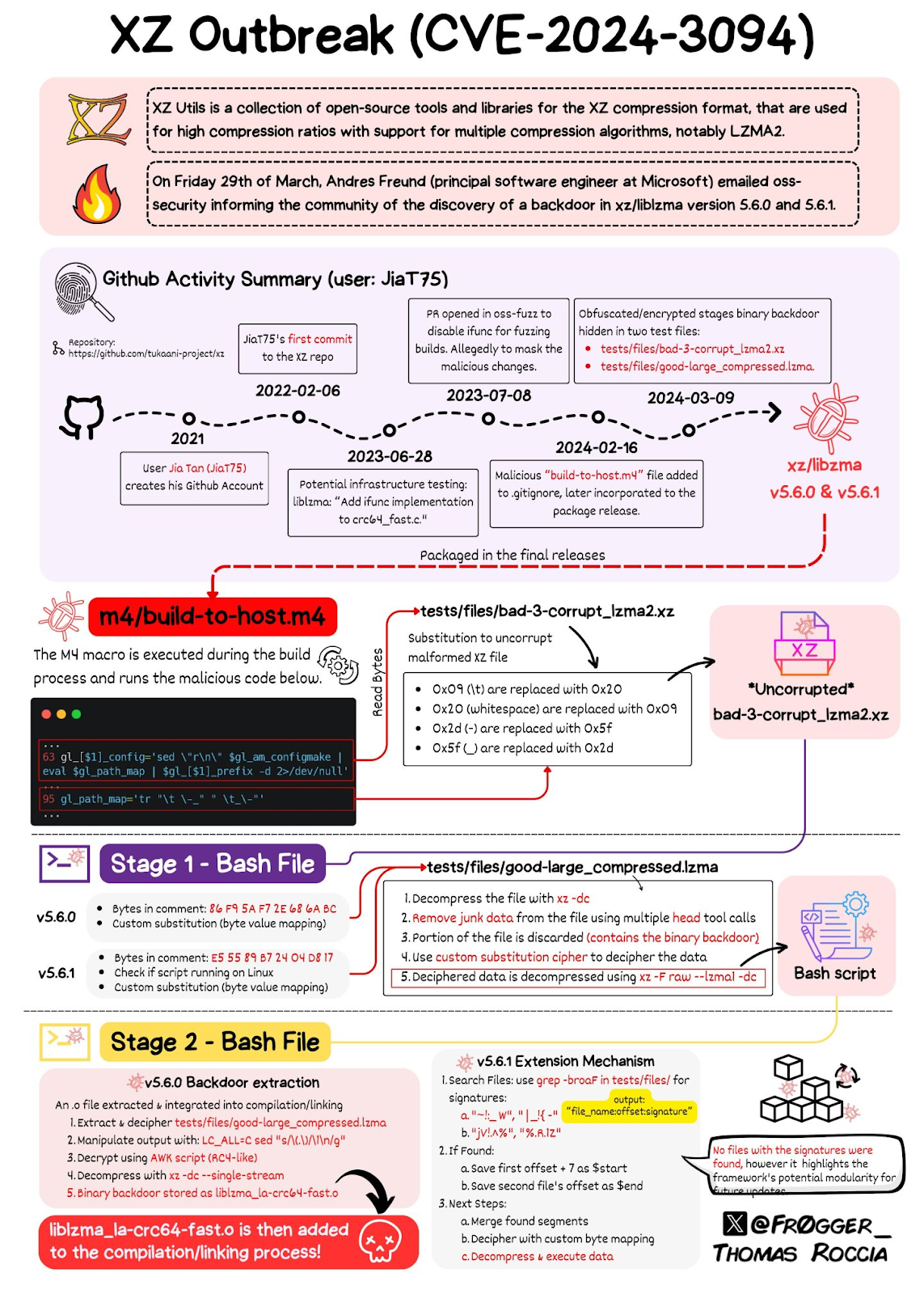
    XZ backdoor explained by Thomas Roccia

    Other Backdoor Attempts 

    Outside of Linux, programming languages are vulnerable to backdoor attempts too. 

    Python is widely used in Linux as an automation language with Bash, and AWK. Recently, security researchers found three packages with total 39,000 downloads. These three packages are in fact, malicious. 

    In fact, these attempts are so common that there is an entire Github Repository dedicated to them. Security researchers  called these attacks as supply chain attacks. 

    Conclusion

    Linux is a Free Software which anyone can change so, someone can change it for malicious purpose too. You don’t need to worry however, since Linux vendors and communities constantly monitor these dangers. Whenever you want to install something, you need to be careful and make sure you trust the package. If you installed suspicious packages, follow the instructions to remove them.

    References